

 Free Shopify app
Check, crop and copy in one app
Three tools, built on Meta’s own numbers. Every size and limit below is the one the app checks.
01Readiness
Check each product against Meta’s specs
The product list marks each product “Ready”, “to improve” or “to fix”. Open one to see every check: what Meta asks for, and what your product has.
No spec sheet in another tab, no measuring photos by hand, no guessing which field Meta wants.
Adwize: Meta Ads KitReadiness 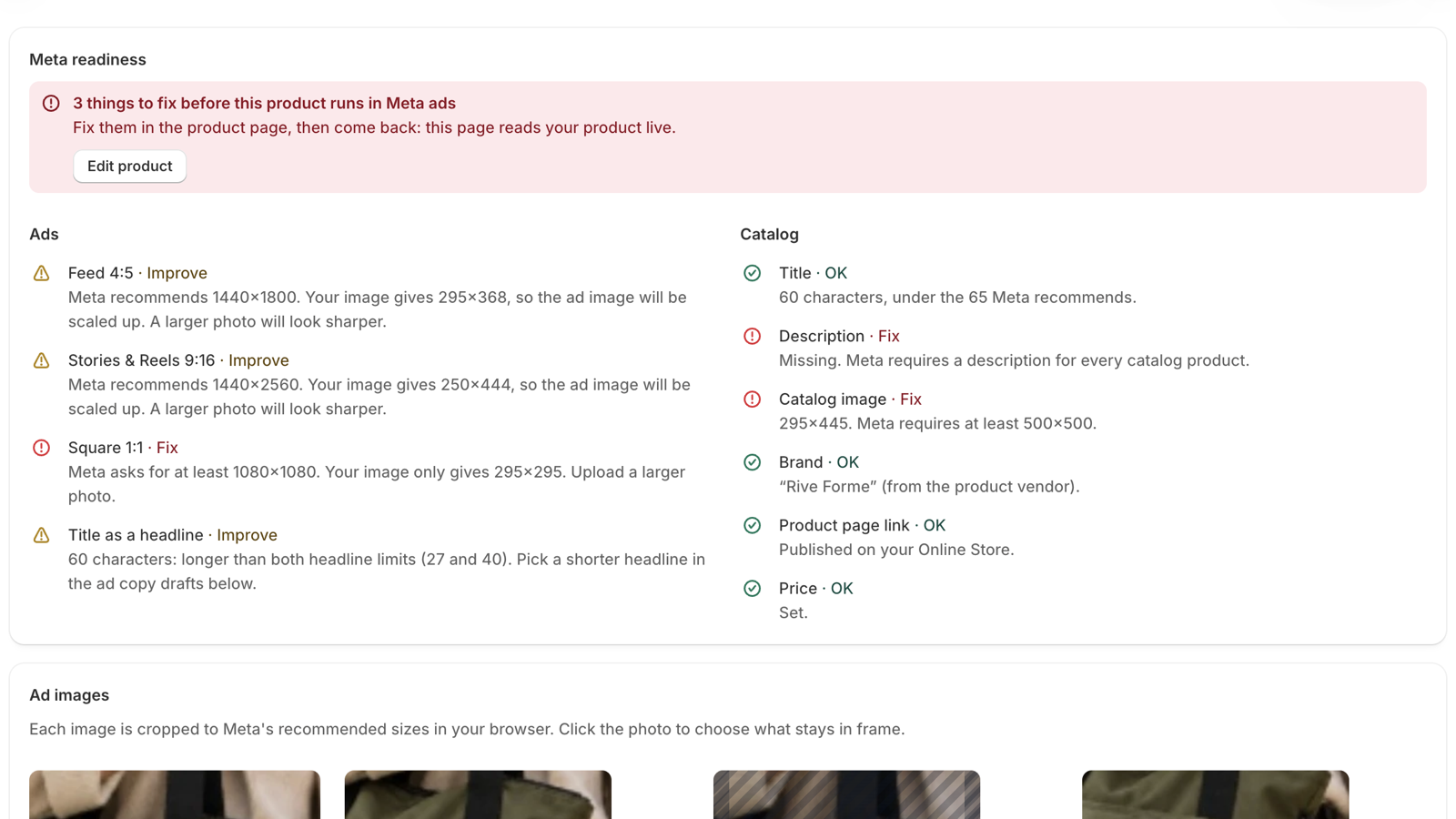
What it checks
- Feed 4:5
- 1440×1800 recommended
- Stories & Reels 9:16
- 1440×2560 recommended
- Square 1:1
- 1080×1080 minimum
- Title as a headline
- 27 characters on Facebook Feed, 40 on Instagram Feed
- Catalog title
- 200 characters max, under 65 recommended
- Description
- Required
- Catalog image
- JPEG or PNG, at least 500×500
- Brand
- Read from the Vendor field
- Product page
- Published on your Online Store
- Price
- Required
02Ad sizes
Export the photo at Meta’s sizes
Click the photo to set the focus point, then download a JPG for each placement. The Stories & Reels preview shades the bands Meta’s interface can cover. Cropping runs in your browser: the image is never uploaded.
No design tool, no resizing by hand, no upload to a third-party site.
Adwize: Meta Ads KitAd sizes Feed 4:51440×1800 recommended Square 1:11080×1080 minimum Stories & Reels 9:161440×2560 recommended What you download
- Feed 4:5
- 1440×1800 JPG, for Facebook and Instagram Feed
- Stories & Reels 9:16
- 1440×2560 JPG, for Stories and Reels
- Square 1:1
- 1080×1080 JPG, for carousel and Marketplace
- Safe zones
- 14% top, 35% bottom, 6% each side
03Ad copy
Copy ad text drafts
Get primary text, headline and description drafts built from the product’s title, description, brand and price. Each draft shows its character count against each placement’s limit. Copy one in a click and paste it into Ads Manager.
No blank page, no counting characters, no AI inventing claims you never made.
Adwize: Meta Ads KitAd copy 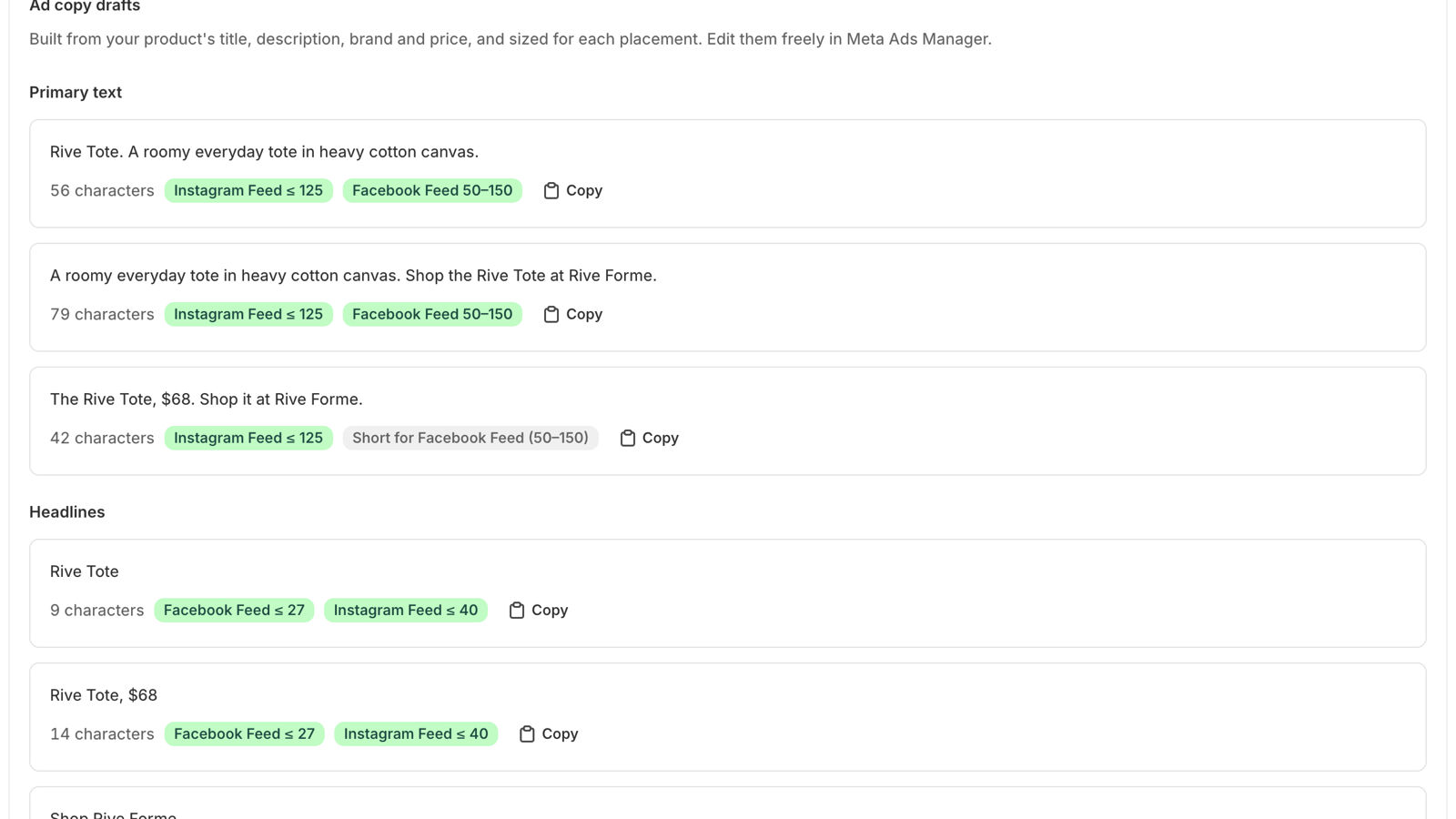
Limits it counts against
- Primary text
- 125 characters on Instagram Feed, 50 to 150 on Facebook Feed
- Headline
- 27 on Facebook Feed, 40 on Instagram Feed
- Description
- 18 on carousel, 30 on Marketplace
- How drafts are made
- Fixed templates, no AI
Go from product to ad in three steps
Install the app
Add it from the Shopify App Store in your Shopify admin. It asks for one permission: read your products.
Open a product
The list shows which products are ready for Meta. Open one to see its checks, crop its photo and read its drafts.
Build the ad in Ads Manager
Upload the images and paste the text in Meta Ads Manager. Fix flagged fields in Shopify, then open the product again to check.
Data & privacy
This is the privacy policy of the Adwize: Meta Ads Kit app for Shopify. In short: it reads your products while you use it, changes nothing and stores nothing.
Questions about your data: adwize.growth@gmail.com
For the Adwize website and the Adwize product, read the Adwize privacy policy.
- What the app reads
- Your products, while you use the app: title, description, vendor, product type, status, price range, photos, SKU, stock count and Online Store status. It also reads your store name, which fills in the ad copy drafts.
- Permission
- read_products only. The app can’t see orders, customers or payments.
- What it changes
- Nothing. Access is read-only: it can’t edit, create or delete a product.
- What it stores
- Nothing. No database, no copy of your products, no access token kept. Product data goes from Shopify to your browser through the Shopify admin, and stays there.
- What it shares
- Nothing. Photos are cropped in your browser and saved to your computer. No data goes to Adwize, to advertisers or to anyone else.
- Cookies and tracking
- No third-party cookies, no analytics, no ads. The app loads only Shopify’s own App Bridge and Polaris scripts.
- Hosting
- Vercel serves the app’s files. Our only server code answers Shopify’s webhooks, below. Its log notes the webhook topic and your store’s myshopify.com address.
- Uninstalling
- Remove the app from your Shopify admin at any time. Nothing of yours stays on our side.
GDPR webhooks
Shopify sends these requests to every app. Each one is checked against Shopify’s HMAC signature first; a wrong signature is refused.
| Webhook | What Shopify asks | What we do |
|---|---|---|
customers/data_request | Send a customer the data the app holds on them. | Acknowledge it: the app holds no customer data. |
customers/redact | Erase a customer’s data. | Acknowledge it: there is nothing to erase. |
shop/redact | Erase your store’s data after you uninstall. | Acknowledge it: there is nothing to erase. |
app/uninstalled | Tell the app you removed it. | Acknowledge it: there is nothing to clean up. |
Questions about the Meta Ads Kit
Still unsure? Email adwize.growth@gmail.com.
Yes. The app is free, with no paid plan.
No. It asks for read access to products only (read_products). It shows you what to fix; you make the changes in Shopify yourself.
No. It reads your products while you use it and keeps nothing. It never reads customer data. The Data & privacy section gives every detail.
No. The app works on its own and has no access to Adwize. Adwize is a separate product, for those who want an agent to run their Meta campaigns.
No. Drafts come from fixed templates, filled with the product’s title, description, brand and price. Nothing is invented, and you edit them as you like.
From Meta’s Ads Guide, read on September 24, 2026, and Meta’s product data specifications for catalogs, read on October 1, 2026. Our Meta ads specs page lists every size by placement.
No. Its interface is in English only.
Soon. The Shopify App Store listing is being prepared. This page will link to its listing once it is live.
Get help with the app
Email us with your store’s myshopify.com address and the product you’re looking at.
Email supportadwize.growth@gmail.com
Where the numbers come from